Blog

Principles of Naming Conventions for Post Production Workflows - Part 7

Example 4 - Interactive Project

This naming convention was developed for a gigantic interactive media project.

As opposed to a typical media project where the audience watches the deliverable passively, interactive projects call on the audience to become active “crafters” of the story, experiencing their own version of it depending on the choices they make on each watch. As the audience was welcomed into this media experience, they were given the choice to take on three different stories, each one had its own structure, acts, and scenes.

Such a project is delivered as many different videos, which are then managed by an interactive platform in a sort of node map. In this particular platform, the node names matched the video file names, and these node names could further be used as variables to program complex story paths through javascript. Therefore the filenames for this project needed convey the story’s structure, its alignment with the node map, and be easy to use as variable names.

Another additional challenge is that this interactive platform truncated any filename longer than 8 characters, so to make it easier for the tech team to manage the files on the platform, we restricted the names (not including iteration naming) to specifically 8 characters.

The carefully scripted footage was shot, and ingested into post within a day. A total of 900 deliverables was then edited by a team of 8 editors. Each deliverable had iteration naming for review purposes, but this was then parsed by a program that stripped the iteration portion before uploading to the interactive platform.

The complexity of an interactive project requires careful planning and execution, so there were no changes made to the script through the edit, and each node of the story was accounted for. We established the principles of the naming convention, and then an index document that described the name of each expected node/deliverable and their content.

The basic rules of the naming convention were as follows (I've changed key details to protect proprietary information):


Interactive Media Naming Convention


To facilitate the understanding of building the interactive node map with our naming convention, we’re borrowing story-writing terms to describe the relationship between nodes. These terms have specific meaning in our workflow so be sure to review our glossary document, or ask your supervisor if you have any doubts.


Naming Rules


Each filename is restricted to 8 characters, always.

Character 1 is the Story: L for the Lab story; A for the Action story, B for the Bunny story, and G is a General category)

Character 2 is the Act within each Story. Depending on the story structure this may be a letter or a number.

Characters 3 and 4 are the Scene.

Character 5 is always an underscore: _

Character 6, 7 and 8 are the Beat (which corresponds to one specific node/deliverable within the story)


Node Index (excerpt)

Lab Story


HQ Scene


L1H1_STR - Lab HQ Start Button.


L1H2_INT - Lab HQ Intro - Job title choice point: Fun Person/Play Agent.


L1H3_JFP - Lab HQ Fun Person, transition into the Lab.


L1H3_JPA - Lab HQ Play Agent, transition into the Lab.


Lab Scene


L1L1_JFP - Lab Area, Lab guy’s introduction with Fun Person job title callback


L1L1_JPA - Lab Area, Lab guy’s introduction with Play Agent job title callback


Experiments Picking Scene


L2E0_INT - Experiments intro,


L2E0_ONB - Lab guy introduces experiments and onboards user on experiment buttons


L2E0_PCK - Pick experiment


Experimentation Scene


L3E1_RVL - Experiment 1 Reveal


L3E1_AN1 - Experiment 1 Angle 1


L3E1_AN2 - Experiment 1 Angle 2


L3E1_END - Experiment 1 Ends


L3E2_RVL - Experiment 2 Reveal


L3E2_AN1 - Experiment 2 Angle 1


L3E2_AN2 - Experiment 2 Angle 2


L3E2_END - Experiment 2 Ends

Principles of Naming Conventions for Post Production Workflows - Part 6

Example 3 - Cosmetics Ad Agency

This naming convention was developed for an agency with an in-house studio that produced regular ad campaigns for cosmetic brands from repeat clients.

When I joined the agency, we set out to build an efficient integrated workflow. Beginning with the shoots, the in-house studio would produce and film footage that was immediately ingested, proxied, and backed up to a tape server–which was then used across multiple campaigns for each client. All content was then edited and animated on Adobe Premiere and After Effects (using dynamic links in the timeline). Project files and other media assets lived in an intranet-accessed NAS, while raw footage or proxies were accessed through a 10GbE SAN. Similar to the footage, each client had brand-specific assets that spanned multiple campaigns and followed a lifecycle independent of other assets.

The campaigns had flexible scopes, which were often expanded, or forked into different projects. Each campaign had a job ID, which was used to track all deliverables, assets, hours logged, and client feedback. These job IDs corresponded across filesystems, proofing platforms, and project management portals.

Given these needs the naming convention needed to account for a large team composed of staff and freelancers; as well as all the technology infrastructure and many programs used in the pipeline.

After months of development we created a lengthy and thorough naming document. That presented the additional need of flattening the learning curve for all users as much as possible. To achieve this we set up a dedicated easy-to-remember URL with the naming guidelines, as well as a stylized desktop wallpaper set up on all agency workstations.

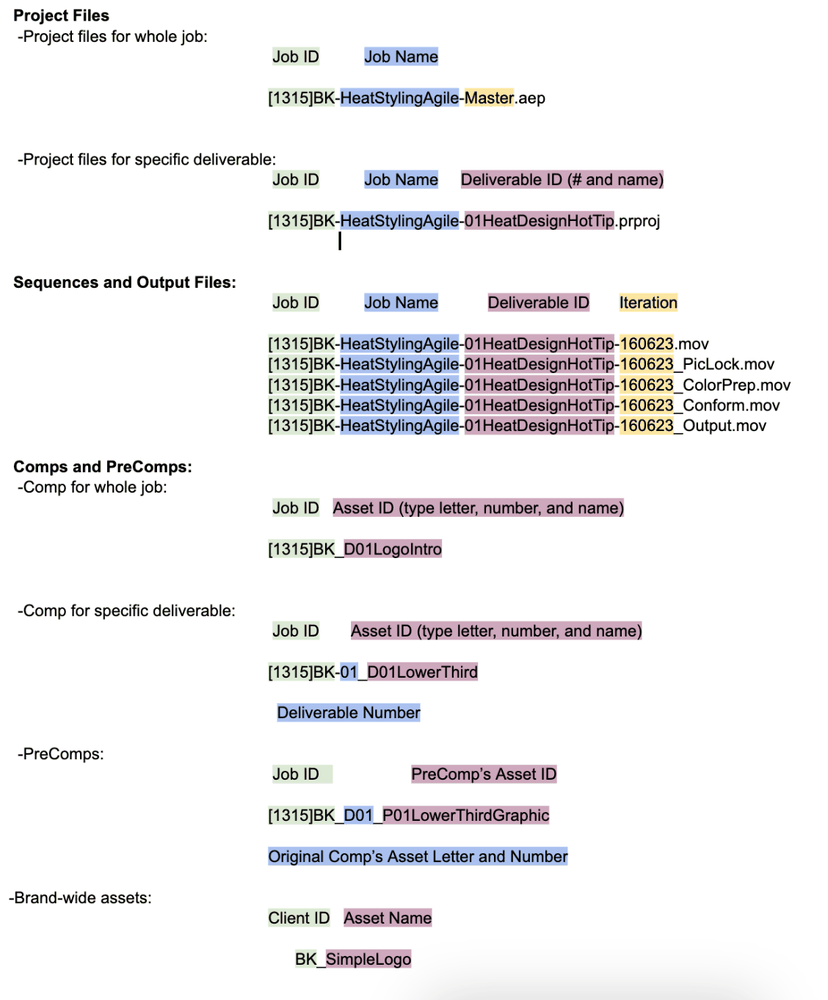
This is the naming convention document created for this workflow (I've changed all details to protect proprietary information).


Post Workflow Naming Summary


Post Workflow Naming Summary
This summary was hosted on a dedicated URL and followed by the more verbose guidelines


Post Workflow Naming Guidelines


The rules in this document have been developed to ease all processes in the post workflow. Wherever there is confusion, please contact the author for clarifications.


1. Syntax


1.1 Allowed Characters:


When naming folders, files, sequences, or comps, the only characters allowed are uppercase and lowercase letters, numbers, underscores _ , dashes - , and square brackets [ ]. Each of these has specific uses and meanings which are defined in this document; do not use them in any other way. Also, do not use any other characters (e.g. @, !, *, &, /, :, etc.). Spaces in filenames are strictly prohibited, use camelCase instead (e.g. ThisIsCamelCase).


1.2. Name Fields:


The naming convention for deliverable/output files, sequences, comps, and working files aims to convey information about their usage and their origin. This information is separated into “fields”; and each field is separated from each other by hyphens - or underscores _ . Underscores are used to reflect dependencies and relationships and should not be used as space replacement. Initialisms are in ALL CAPS, do not use dots (R.A.C. is RAC, e-learning is eLearning).


Job ID: The first field in the name of any deliverable/output file, sequence, or comp begins with the job number (enclosed in square brackets), which is followed by the client ID. Together, these two portions make up the Job ID (e.g. [1315]BK, [1182]MF, [1286]CL, etc).


Job Name: The next field after the Job ID is the project name, (e.g. [1315]BK-HeatStylingAgile, [1182]MF-UltraHDLaunch, [1286]CL-TrifectaHowTo). This name is usually a descriptive phrase or word that is related to the client’s name for the job and is interchangeable with the Job ID when talking about a job. In specific cases, the Job Name field can be omitted to shorten the name of a file.


Deliverable ID: The next field after the Job ID and/or Project Name is the Deliverable ID. The deliverable ID is composed of the deliverable number, and the deliverable name, e.g. [1315]BK-HeatStylingAgile-01HeatDesignHotTip, [1182]MF-UltraLaunch-02Christen, etc.


Asset ID: The asset ID is used for comps and other assets/media related to a deliverable or job, and it is very similar to the deliverable ID; but it is prefixed by an underscore instead of a dash to convey a dependency or relationship. The asset ID is formed by the asset type letter, asset number, and asset name. In an asset name, the job name field can be skipped. For example, when a comp is related to all the sequences in a job, its name would begin with the job ID and be followed by the asset ID, e.g. [1315]BK_D01LogoIntro (refer to section 3 of this document for asset type initials). When a comp is specific to a deliverable, the name for the comp would be the Job ID, the deliverable number, and then the asset ID, e.g. [1315]BK-01_D01LowerThird. Pre-comps follow a similar naming, such as [1315]BK-01_D01_P01LowerThirdGraphic. This naming will make it easy to track a rendered asset’s origin.


Iteration: The last field for any sequence’s name and their corresponding exported deliverable file is the iteration field. Iterations are expressed in YYMMDD format for the latest date that the sequence/deliverable was edited; that is, the latest date that any changes were made to the edit (i.e. subsequent exports of the same sequence would not change the iteration). Do not use terms such as V1, V2, or Final in iterations. The name of an exported deliverable/output file should match its originating sequence, e.g. [1315]BK-HeatStylingAgile-01HeatDesignHotTip-160623.mov


2. Specific Usage


2.1 Job Folders


Job folder names have the Job ID and the Job Name.


All job/work folders should be organized into the Asset-Working-Output hierarchy.


2.2 Project Files (.aep, .prproj, .idd, .psd, etc)


All project files have the job ID, Job Name, and Iteration. For project files, the iteration field is alway “Master”, or the Deliverable ID when separating a job into its deliverables. When workload division demands for a job with multiple deliverables to be worked on by several people, save a copy of the job’s Master project file and rename it by replacing the iteration field with the deliverable ID. At the end of a job, all final deliverable sequences should be re-imported into the job’s Master file.


2.3 Sequences and Outputs


All sequences and their corresponding outputs must have the job ID, Job Name, Deliverable ID, and Iteration fields (e.g. [1315]BK-HeatStylingAgile-01HeatDesignHotTip-170301). When making any edits duplicate the sequence into an “Old” bin, and update the Iteration field date; this will make sure that any properly iterated output can be easily tracked back to its originating sequence.


Once an edit has been picture locked and the sequence is moving into the turnover process, 4 additional sequences will need to be made (picture lock, color prep, conform, and output sequences). Append an underscore and suffix to denote the sequence stage:


[1315]BK-HeatStylingAgile-01HeatDesignHotTip-170301_PicLock


[1315]BK-HeatStylingAgile-01HeatDesignHotTip-170301_ColorPrep


[1315]BK-HeatStylingAgile-01HeatDesignHotTip-170301_Conform


[1315]BK-HeatStylingAgile-01HeatDesignHotTip-170301_Output

The PicLock sequence is a direct copy of the last edit iteration sequence.


The ColorPrep sequence has only the footage used in the edit, including what’s composited in Ae dynamic links; and with all motion, time remapping, and other effects removed. The Color Prep sequence is then used to output an XML to send to DaVinci Resolve for color grading.


Once color grading is finished, the Conform sequence is used to bring back the clips rendered from Resolve to paste any attributes that were removed from the Color Prep sequence, and placing it back into Ae Dynamic links where needed.


Finally, once all the color-graded footage has been conformed into the edit, the Output sequence reflects what's on the Pic Lock sequence, but with graded footage.


2.4 Comps and PreComps


All Comps must have the job ID followed by an underscore that reflects dependency. If a comp is for the whole job, it only needs the job ID; but if it is specific to a deliverable, the comp must also have the deliverable number. The name of the comp after the underscore should be the Comp Number, a number that corresponds to the order in which the comp was created, then followed by a camel case name that reflects the content of the comp (e.g. [1401]BK_D01IntroLogo, [1401]BK-02_D02LowerThirdJane).


PreComps follow a similar naming convention as comps, but they need to have a P before their Comp Number.


2.5 Media and other Assets


All media and assets (except for footage, general files, or general Client files) should be scrubbed of non-allowed characters (including spaces), and then the job ID should be added as prefix to the filename.


2.6 Footage


At this agency “footage” specifically refers to unedited original camera media. Wherever possible the naming of files output by the camera should be changed to meet the guidelines described in this document (with the exception of certain non-wrapped media formats such as Red Raw).


Footage files have three fields: FYMD, DeviceID, and InputName.


• FYMD: this field always starts with a capital letter F, and is followed by the day that the footage was shot in a YYMMDD format. When multiple shoots happen simultaneously, the CliendID is added to the end of the FYMD field.


• DeviceID: this field should be written in all caps, and reflects the device type, letter, and name. The device type can be either CAM for cameras, or AUD for audio recorders. The device letter corresponds to the device order and pairing (CAMA should be paired with AUDA, etc).


• InputName: this field is the original name of the footage file scrubbed of all non-allowed characters, and repeat information (such as date embedded into the filename by the camera). Make sure to process the footage files before they are used in any job.


3. Asset Type Initials


• D : Dynamic Links


• P : Pre Comps


• T : Text or graphics fonts that belong with a paired footage comp


• C : Footage that has been composited so that a Text Comp can be layered over it in Premiere


• N : Nested Sequences

Principles of Naming Conventions for Post Production Workflows - Part 5

Example 2 - Localized Instructional Videos

This naming convention was developed for a series of explainer videos published in many different languages, describing how to use the features of a device for a technology company. Aside from the many different languages the content needed to be translated to, each topic was animated with different visual elements (like colors to match the device user's settings, or disclaimers); or was rendered in different resolutions to match platform usage. These would be released with periodic frequency whenever the client updated or released a new feature for said device. One feature might have up to 30 different deliverables, so in a small round of 5 features, that could represent about 150 deliverables.

To produce this vast amount of deliverables, handlers would capture the device and ingest its footage into a motion graphics program, where a team of animators would add all the different elements for each version. The animated renders would then be reviewed by different QC teams (for feature, visual, and language). These QC teams would ensure that the renders met feature content needs, had no visual errors, and had appropriately translated or adapted specs for each localized version. Once each deliverable passed QC, they would be sent to the client’s different internal departments to be used for distribution across user devices and advertising platforms–so the naming convention needed to also align with their distribution workflows.

With this large number of different deliverables, the naming of files needed to quickly convey what elements the animators, QC, and client teams would find in the content of each version.

These are the guidelines developed to meet that challenge (details have been changed to protect proprietary information):


Naming Convention

Each instructional video, or topic, created in this project is delivered first in English US language, and to two different departments (Users, and Adverts) with their respective deliverable specs.

Each topic is also localized to as many languages or “localizations” as requested by each department. That is, the language, and the date/time/temperature format is adapted to a different region or locale. You will see a four letter localization code in each deliverable’s filename that refers to their specific localization (following the ISO-639 and ISO-3166 language and country code combination, as defined in this page). For example, enGB (English, Great Britain), frCA (Canadian French), itIT (Italian), etc. You may also read or hear the term “L10n”. This is a numeronym, or abbreviation of the word Localization, and in our workflow’s context refers to all deliverables except for enUS (English US).


The naming convention of each topic works as follows:

[topicDept]-[topicName]-[device]-[exportType]-[language]

For example:

usr-Unblock-HAL-BL-enUS.mp4
usr-Settings-HAL-RD-frCA.mp4
adv-Settings-HAL-9x16-itIT.mp4
1-[topicDept] there are two options for this: “usr” and “adv”. These correspond to the client's departments.


2-[topicNamel] this is what the client calls the topic. The “topic name” column in the topics spreadsheet will tell you what this should be.


3-[device] is the device the topic is meant for. In our example “HAL” is the HAL 9000


4-[exportType] refers to the type of export, and its spec

  • RD Red Background H264 MP4 450-600Kbps, no Audio
  • BL Blue Background H264 MP4 450-600Kbps, no Audio
  • 1x1 1x1 ProRes 4444 MOV w/Alpha & Disclaimer, no user input
  • 9x16 9x16 ProRes 4444 MOV w/Alpha & Disclaimer, no user input
  • GIF GIF 24fps 720x720 HQ Loop Forever, w/user input & Disclaimers

5-[language] is the language, or localization the topic is in.

  • enUS - English US
  • enGB - English, UK
  • deDE - German
  • esES - Spanish
  • frFR - French
  • frCA - Canadian French
  • hiIN - Hindi
  • itIT - Italian
  • jaJP - Japanese
  • zhTW - Taiwan/Traditional Chinese
  • zhCN - Simplified Chinese
  • svSE - Swedish
  • daDK - Danish
  • nnNO - Norwegian
  • nlNL - Dutch

Principles of Naming Conventions for Post Production Workflows - Part 4

Example 1 - Archival Sports Documentary

Let’s begin these examples with a short and sweet naming convention.

These naming guidelines were developed for a historical sports documentary project that used archival clips, interviews, and dramatized vignettes. While the interview and vignette files kept their original names, the archival footage needed a convention that solved a few challenges.

For one, the film was edited on Avid MC by a team of archivists and editors across two countries with opposing time zones, so communication between the teams was scarcely real time.

The archival footage mainly featured historic matches of an international sport, with each region or country having its own copyright agency (and therefore its own licensing process). The footage was initially collected from broadcast tapes or YouTube links and later replaced with media acquired from the copyright holders after a licensing agreement was negotiated and signed.

A process was created for the edit team to parse sequence EDLs and ALEs into a spreadsheet that reflected where archival was used, and calculated the usage cost of each piece based on active negotiations with regional licensing agencies.

The solution was a straightforward indexed naming convention that facilitated the gathering, tracking, and pricing of archival footage and its copyrights using that spreadsheet.

Here are the basic guidelines of this naming convention, and a sample set of filenames derived from this naming convention:


Archival Naming Convention

-All archival footage filenames must begin with a 4 digit number, in order of its ingest. To find the latest number in order, please refer to the Archival Usage spreadsheet.

-Those 4 digits are followed by the type letter: a V (for archival video); a P (for archival images/pictures); or an S (for archival audio/sound).

-The type letter is followed by a dash and the copyright holder agency/country three-letter code. Please refer to the Archival Usage spreadsheet’s Holders tab for the corresponding copyright holder code.

-The type letter is followed by a dash, then the original filename/title of the archival footage, with all special characters removed, and spaces replaced with underscores ( _ ).

-For footage gathered from YouTube, please append the link ID to the end of the filename.


Sample filenames

0015V-BFC-World_Tournament_Victory_Celebration1_2018-QGRtf0ZCg9.mp4
0016V-BFC-World_Tournament_Victory_Celebration2_2018-IAoird988rq.mp4
0040S-ATC-EU_May_Match_2015_ATC_Radio_Broadcast.wav
0041S-RFF-EU_May_Match_2015_RFF_Announcements_Broadcast.wav
0054V-AUT-AUvEN_Game_Highlights_2016.mxf
0055V-AUT-AUvSA_Game_Highlights_2016.mxf
0058V-ICD-INvSL_WorldCup1995_204_252436_38.mov
0059V-ICD-INvSL_WorldCup1995_204_252436_39.mov
0065V-ICD-INvSL_WorldCup2010_304_252537_31.mov
0066V-ICD-INvSL_WorldCup2010_304_252537_32.mov
0073V-ICD-PKvIN_2005WorldChamp_252438_98803.mov
0074V-ICD-SAvIN_KnockOut2017_252438_98804.mov
0075V-GBO-APassageTo84.avi
0076V-RFF-GGD1948.mp4
0087V-ABD-46419_SecondTask.mp4
0088V-ABD-46421_GameLate.mp4

Principles of Naming Conventions for Post Production Workflows - Part 3

The Standards

These are some of the standards I've implemented in my own naming conventions; many of which apply two or more of the principles I've written about. These are the type of recommended rules you're likely to find in other literature, and each should be considered through the lens of the principles as relevant to your workflows. While I highly advocate for some of them as essential, they're only meant to illustrate ideas that could be applicable to your workflow, as every team is sure to come up with novel ideas that best suit their projects.


ISO 8601 Iteration

The ISO 8601 standard defines a date format displayed in YYMMDD order (or YYYYMMDD in some cases). This format is commonly adopted in naming conventions when used for defining iterations as appended to the end of filenames. It provides an easy way to assess the latest version of a file and leads to less confusion than using standards like "FinalFinal" or "V1," "V2," etc. The ISO 8601 standard is scalable, and if you were to view all your iterations in one folder, you can quickly spot the latest version when sorting by name in your file browser. ISO standards are a great source for well-documented practices.

Example:

Video1-19990504.mov
Video1-19990506.mov


Symbols/Special Characters

It is advisable to avoid using most special characters in filenames as they are often incompatible with various platforms, and they could cause trouble in the alignment of your team. However, the dash and the underscore are the most commonly compatible special characters and can be used prescriptively to enhance readability and organization. Consider how you use these in your workflow, how your programs parse them, and what specific meanings you assign to them.

Example of what should be avoided:

Video 2 #Cool!.mov
Video 3 This/That? .mov
Example of what to use:

Video_2-Cool.mov
Video_3-This_That.mov


CamelCase/Capitalizations

The choice of case in file names has been a topic of debate, but in my experience, CamelCase works best in most cases. CamelCase replaces the need for spaces in filenames without resorting to underscores or dashes (which leaves them open to be used in other methods). It involves capitalizing the first letter of each word within the filename, which improves readability and ensures consistency.

Example:

Video4-AwesomeCampaignAd.mp4
Video5-HowILearnedToStopWorryingAndLoveNamingConventions.mp4


Breadcrumbing

Breadcrumbing is the practice of adding relevant information to your filename in a hierarchical order. For example, you can add the client name, the project name, and the deliverable/asset name. Each piece of information provides clues as to what other assets are related to your file and where to find a project's information in a CRM or project management platform. Additionally, breadcrumbing helps guide orphaned files (files that were removed from their original location) back to the folder where they belong.

Example:

ClientABC-SquareLogo.png
ClientABC-CampaignD-Animation1.mp4
ClientXYZ-Project5-Video8_OrgChartImage.jpeg


Indexes

Indexes are immensely helpful in keeping files and folders in a chronological or sequential order. An index is typically represented by a number at the beginning of a filename, allowing for easy sorting and identification of files and folders based on their order of creation or relevance.

Example:

1-Footage
2-Assets
3-ProjectFiles
4-Output


Leading Zeroes

When consistently using numbers in filename conventions, it is recommended to add leading zeroes. By padding numbers with leading zeroes, you can maintain consistent formatting and prevent sorting issues, regardless of the platform or file browser used.

Example:

MovieClip-0001.mov
MovieClip-0002.mov
MovieClip-0003.mov


Character Restrictions

Certain platforms, such as file browsers or project management platforms, may truncate filenames that exceed a specific number of characters. To avoid potential issues, consider limiting the number of characters allowed in your filenames. By keeping file names concise, you ensure that their full names remain visible and easily readable within various software environments.

Example:

From

PlanetEarthClient-AdCampaignNumberOne-VideoEdit02-190203.mov
To

Earth-Camp01-Vid02-190203.mov


Letter Code Abbreviations

For repetitive information or variables across your filenames, you can codify or abbreviate it into recognizable letter codes, rather than spell it out every time it is used. Letter codes can describe from the very simple, like 2-letter country codes (e.g US for United States, GB for Great Britain, JP for Japan, etc), to the more complex like different technical specs. When used on this type of easily understandable information, this standard can save time when typing it out or sorting through files.

Example:

From

TornadoClient-AdVideo01.mov
To

TND-AdVideo01.mov


Highlight Fields

You can experiment with highlight fields by following these steps.

Double click on this Word.

Now-double-click-on-this-Word.

And_now_on_this_Word.

AndLastOnThisWord.

Do you see how each word or group is highlighted?

These are called highlight fields, and the way you separate words within a filename can affect how these fields are merged or split.

You can also navigate through a highlight field with your keyboard’s directional arrows and a modifier key (Command, Control, Option, etc).

Properly separating or joining words into highlight fields with spaces, dashes, underscores and CamelCase can enhance readability and help your workflows, even with complex naming structures.


Information Prefixes and Location Consistency

Another way to codify information in your file names is by using highlight fields, character order, or character prefixes to define where a key part of that info will be found. You can create a naming convention where, for example, the first 3 letters of your file name are the client code, which is then followed by an underscore and 4 digits that describe the project number. Or you could prefix the key terms with an underscore and a lowercase letter that together describe the category of the words that follow them–such as _c for client, _p for project, etc.

This type of standard is especially helpful when your file workflows include handling by automated systems. The one risk is that, without consistency in this standard, it can easily break those systems.

Example:

ClientABC-AdCampaignProject9851-DeliverableVideo01-60SecondVersion.mov
ABC_9851-Vid01-60s.mov
cABC_p9851_dVid01_t60s.mov


By implementing these and other standards in your naming conventions, you can enhance file organization, improve searchability, and minimize confusion within your team's workflow. Remember to adapt these standards to suit your specific project requirements and collaborate with your team to develop naming conventions that work best for everyone involved.

Principles of Naming Conventions for Post Production Workflows - Part 2

The Principles

A principle, in the context of a naming convention, is a fundamental value through which a rule or standard is ascribed. This list should function as a sort of thinking rubric from which to derive, and even modify, your naming guidelines.


Communication

The main goal of any naming convention in media post-production is to improve communication across a team, by minimizing the need for interaction to obtain information from collaborators.

When working individually a good naming convention can help you quickly make sense of your projects, your exports, and all other assets—saving precious time that adds up. When working in a team, it minimizes the time spent emailing and messaging as you search for clarity on what files or assets to use, assessing the content of an individual file, or distributing updated information as materials change to keep the whole team aware.

Communication is the base of the pyramid of any efficient naming convention. It is the ruler by which all other principles are measured. The ultimate benchmark question for any naming convention rule should always be: “Does this help communication in my team?” If it doesn’t, then it is better dropped.


Consistency vs Flexibility

All media assets should be named using a consistent, structured naming convention regardless of their type or format.

When working in a large team, with competing needs, and varied skill sets, a stringent naming convention can soon find itself becoming irrelevant if it doesn’t account for every possible scenario and contingency in a project. On the other hand, a naming convention without some strictness will be useless and provide no actual help in communicating or searching for the files needed. Therefore, a good balance must be found. Where that balance lies will depend greatly on the particular needs and workflows of you and your team.

In my experience, the best balance is usually found where consistency is given a greater weight than flexibility. The best approach to finding that balance is to have ongoing conversations within the team, imagining every plausible scenario, and creating a naming convention that covers most of them, while allowing a bit of flexibility here and there, and documenting/reporting any exceptions.


Repetitive Logic

A good naming convention follows a clear repetitive logic that can be easily understood by anyone in the team. Anyone joining the team midway through a project, should be able to discern a lot of the rules of the naming convention simply by looking at the files and folders where the project is stored. With practice, that repetitiveness will become second nature to anyone using it.

Note that a repetitive logic doesn’t equal a repetitive pattern. Sometimes, depending on the type or use of a media asset, its naming parameters might be different from another file type, but the thinking or logic of how that pattern is derived should be relatively easy to discern.


Brevity vs Verbosity

A media file’s name should be easy to read and easily convey its contents, so that anyone working with it can quickly make sense of it. This includes using descriptive, unambiguous names that accurately reflect the content of the asset. However, depending on your viewing environment or resolution constraints, if a filename is too long it is likely to be truncated. Therefore, filenames should also aim to convey that content in as brief a description as possible.

A file name such as RY01_STR, though brief, is highly codified and its content would be unclear to anyone unfamiliar with its naming convention; while a file named adjustments-assistant_side_button-tablet-1440x1440-30fps-enNZ-screenrecording would be shortened by any browser, and the viewable portion of said file name might be adjustments-assistant_power_bu… instead.

The best naming practices pack as much discernible information with minimal characters, abbreviating or codifying where needed while ensuring that the file’s content remains understandable and without creating unnecessary obstacles.


Search Accuracy

Another key goal of any naming convention is to be able to find the exact assets and files that you or your team need through a search engine, with minimal added noise (files that you’re not searching for). The better your naming convention, the quicker and more accurate your results will be.

In one such instance of added noise, if project names begin with a sequential number, and you search for such a number, you could get results of files that match that number, but have nothing to do with your project. For example, if you search for project 1520, but get a “Clip1520.mov” in your results.

You should also consider what platforms you’ll be using to perform searches, and how keywords and characters would be parsed, as you want results to match across them. What you search for in a Finder/File Explorer/CLI search, might be different from what you get in a media editing or design program. So consider things like the use of symbols and sequential patterns, and how they affect your queries. For example, searching for * in Mac OS Finder, will provide results with the actual asterisk in their name or content–it does not function as a wildcard. While the same search in Premiere will provide no results.

For best results, you should test your naming convention across all platform and program searches in your workflow.


Scalability

As projects grow in size, complexity, and longevity, it becomes increasingly important to have a naming convention that is scalable. Whether you’re working on a one-off project, or in a team with frequent projects, your naming convention should be able to accommodate a large number of media assets within and across projects, while also remaining organized and easy to manage.

For example, if you create a naming guideline that file names begin with a month and day portion in MMDD format, you will have some trouble if your project extends past the end of the year.

Similarly, if your project names begin with a 3 digit number in a high-volume agency, you may one day reach more than 1000 projects, and those 3-digits will not be sufficient.

Another aspect of scalability is versioning and iteration. Iteration is the different snapshots of your deliverable as it moves through rounds of feedback and improvement. Versioning, on the other hand, is the different variations that the same content (or a portion of it) can be configured–such as a 30-second cutdown of your 2-minute video, or 1x1 and 16x9 versions of the same video. The file’s version or iteration should be easy to read by anyone in your team.

Scalability is ultimately a question of the future, so as you develop your naming convention you should consider what might become of your files and your content–if they might be input into a new process, or if your projects or deliverables could be expanded, revisited, or forked.


Alignment & Lifecycle

Just like a relay race, post-production workflows involve passing a file through different stages. Teams hand off the file smoothly following certain rules and parameters, called "alignment." This journey of the file through all stages is its lifecycle.

Your naming convention should consider what might happen to your files as they move through their lifecycle, and how a file’s name will align through the different processes, programs, and practices of the same.

Will the files be shared, updated, media managed, or archived at any point? Will your deliverables or assets need versioning? And what will happen if a file is ever removed from its original location? Could its naming lead to any confusion depending on where it might be stored? Will its lifecycle bring it back to an earlier team after it has been edited? Will its naming convention cause issues in another process or program of the file's lifecycle? Will adding new staff affect your naming? etc.

As the term suggests, all teams in a post-production workflow should be aligned on a naming convention that meets as many of their stage’s needs without harming the processes of other teams in the lifecycle.


Interrelationships of Deliverables (the Spiderweb)

A naming convention’s needs can be further complicated when you consider projects where different types of assets are deliverables unto themselves, with their own lifecycles, teams, platforms and processes that may run simultaneously. A classic example is a logo that is still going through a revision process that also needs to be used in an intro for a 30 second animation that is currently being animated, or a placeholder clip in an highlights edit version that will later be replaced with recorded and colored footage from a longer video.

I call these splits of simultaneous processes/deliverables, bifurcations; and their eventual completion and rejoining of a deliverable’s lifecycle, convergences.

The many bifurcations and convergences in a project or deliverable will often feel like a spider web of relationships that need to be carefully tracked, and if not, will cause plenty of headaches and possible mishaps.

These interrelationships between deliverables, and how they're tracked, needs to be carefully considered as you develop your naming convention, especially when your team has little control on the processes of one or more of your assets.


Compatibility

In this digital age, a file’s lifecycle might take it through many different platforms (operating systems, programs, or web portals), processes (a client feedback round, or a shell script that distributes updated copies), and protocols (an SMB connection to a shared NAS, or syncing through a cloud service/WebDAV).

Your naming convention should take into consideration what constraints, if any, are necessary to maintain compatibility of your files through every platform and process it lives through and the protocols used to access them.

For some examples, your platform’s readability might require that your filenames only contain a maximum number of characters; or your programs might not parse special characters like % or & very well, and would need escaping to be handled by a CLI program; or a character could cause issues if you trade files between a Windows or Mac system through a SAN (such as the backslash \ ); or you might want your filename to match a URL for a web proofing platform.

Each program handles characters differently, and you should experiment with your filenames and programs to create a naming convention that will get similar handling of characters across all platforms, processes, and protocols, without causing any issues.

Another aspect of compatibility is expectation consistency. I’ve created workflow automation scripts that distribute deliverables to their respective project folders, but this could only work thanks to a reliable pattern (such as the filename beginning with a 4-digit number, or the second word of the name being the project's name). In a sense, the technology elements in your workflow are another member of your team, and your naming convention should take into consideration the expectations of those elements to function properly.


Recorded

Last but not least, your naming convention should not remain a spoken lore among your team. It should be recorded in an easily accessible document or resource, and kept up to date with any changes.

An online document is the most common solution to this, though I’ve also used desktop wallpapers on workstations as an easy reminder.


As you review the different ideas that will potentially be implemented in your naming convention, you should explore how each one is affected by the different principles in this document. Some of these principles may not be applicable to your workflow or project, and can be ignored–considering the principles that do, you’re certain to arrive at the “best” practices that fit your specific workflows.
Principles of Naming Conventions for Post Production Workflows - Part 1

The Why of this Guide

In my experience working in media post-production, a well-crafted naming convention has been a key element in the workflows of any efficient team. The difference between a project with a clear naming convention across all media assets/deliverables and one without has been staggering—the hours spent making sense of the latter are often substantial.


Whether you’re working solo on a decade-long verité project that later adds a large team after being greenlit for network, working collaboratively on periodic ad campaigns with an in-person agency team, or tag-teaming remotely with a freelance crew that spans different time zones to produce hundreds of deliverables, a good naming convention should be indispensable to your organization and workflow.


Such a naming convention is, in a sense, similar to a well-respected traffic intersection with four-way stop signs. There’s no natural force that stops the drivers arriving at the intersection, or any spoken communication between them. It is borne out of a predetermined agreement between engaged parties, with guidelines that define signaling and behavior expectations, and with each new entrant reading and training on those guidelines. Just like in that example, you will have moments of confusion—such as when two drivers arrive at the intersection at the same time. These can be remedied with minor communication—like the flashing of lights. There will also be moments of chaos—such as when a driver runs past the stop sign. But the overwhelming respect of the guidelines by a majority of participants will make sure that the system runs with few mishaps, and “traffic” continues to run smoothly.


The labor of building, learning, and training collaborators on such a naming convention might seem tedious at first, but it is a time investment that pays dividends in efficiency, both financial and creative.


Every team I’ve joined or colleague I’ve worked along with has had great ideas on what to make of a naming convention—but where experiences differ there can often be a conflict on what’s the best solution. I’ve found little literature that helps video post production teams negotiate their different ideas and make sense of what standards and practices to adopt, or what to abandon, in building naming guidelines. What can be found often intermingles principles and standards—categories which I believe need distinction.


In this text I aim to document and share my own learnings by first describing the principles that I have found to be helpful when creating naming conventions, peppered with minor examples from actual projects; then followed by the methods, tools, or standards I’ve implemented in past workflows. Lastly, real life examples of full-fledged naming conventions I’ve developed with different teams.


I hope this guide can help any other teams (or individuals) out there to find some guidance through examples that someone else has used, or that you find some of your own ideas echoed in this text—and perhaps some completely new ones worthy of sharing with your peers.